Derrik Mattson
Feb 27, 2026

Gusto is a user-friendly payroll platform that's perfect for small US businesses with 1 to 75 employees who want automated tax filing and benefits administration without the complexity of legacy systems. Oh yea and it hits it out of the park for solo entrepreneurs.

TLDR I am already interested. Click Here To Sign Up For Gusto and get $100 back on your first payroll!
Most payroll software is either unnecessarily complicated or missing features you actually need. When I switched to Gusto about two years ago, I was skeptical. Another payroll platform promising to make everything "simple" and "automated." Sure.
But after two years of actually using it, I'll admit Gusto is different. It's not perfect, and it's definitely not for everyone, but it's one of the few payroll tools that actually delivers on the promise of making payroll less painful.
Here's what you need to know before you sign up.
Gusto is a cloud-based payroll and HR platform built specifically for small businesses. It handles the full payroll process including calculating paychecks, filing taxes, managing benefits, and dealing with all the compliance paperwork that makes business owners want to throw their laptops out the window.
They've been around since 2011 and currently serve over 300,000 businesses. That's not small. They started as a simple payroll tool but have expanded into benefits administration, time tracking, hiring tools, and HR support.
The platform works entirely in your browser. No clunky software to download, no waiting for updates to install. You log in, run payroll, and you're done.
This is where Gusto shines. Once you've got everything set up, running payroll takes about five minutes. You log in, review the hours (if you have hourly employees), make any adjustments, preview everything, and hit submit. Done.
The tax calculations happen automatically. Federal withholding, state taxes, Social Security, Medicare, unemployment insurance, all of it gets calculated without you touching a calculator. More importantly, Gusto files all those taxes for you. Every pay period, they handle the federal and state filings. At year end, they generate W-2s and 1099s automatically.
I've used systems where tax filing was a separate manual process that cost extra. With Gusto, it's just included. You're not paying additional fees every time you run payroll or file quarterly taxes.
Most payroll systems treat employees like an afterthought, with clunky portals. Typically information is hard to find, and employees end up bugging HR with questions about paystubs and tax forms.
Gusto's employee experience is clean. Employees log in, see their paystubs, download their W-2s, update their direct deposit info, and request time off. Everything is where you'd expect it to be.
Employees can even onboard themselves. You send them a link, they fill out their W-4 and I-9, add their bank account for direct deposit, and they're done. No printing forms, no scanning documents, no back and forth.
If you offer health insurance, dental, vision, or 401(k) plans, Gusto can manage all of it. You set up the plans, employees enroll, and deductions happen automatically from payroll.
The part that impressed me is that Gusto acts as the broker at no extra cost if you're setting up health insurance through them. They have licensed advisors who help you pick plans, and they handle all the enrollment paperwork. For small businesses who don't have an HR department, this is huge.
I've seen businesses struggle with benefits administration through separate platforms where nothing talks to each other. Gusto keeps everything in one place, and the deductions sync with payroll automatically. No manual spreadsheets, no forgetting to deduct someone's insurance premium.
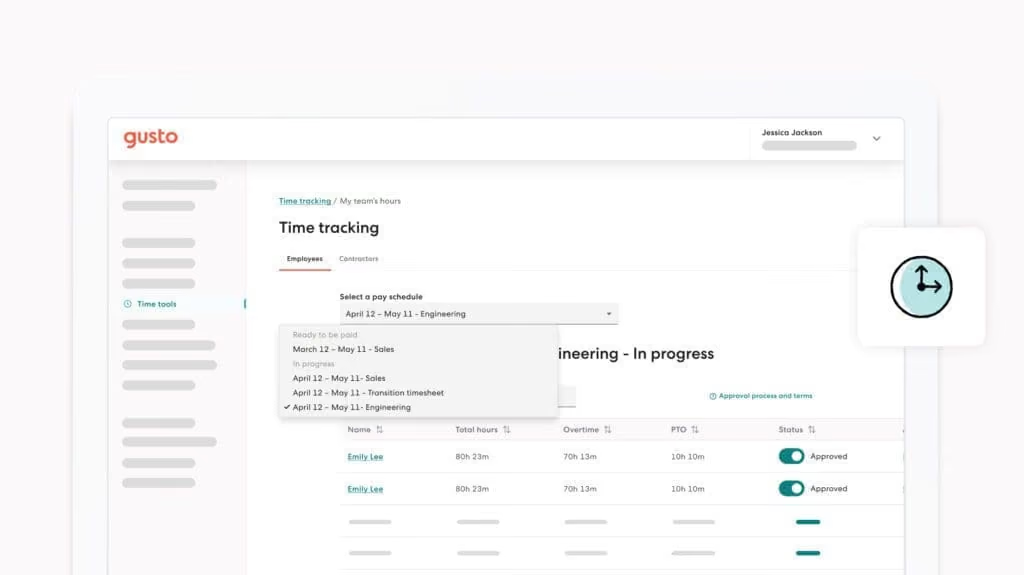
Gusto has a basic time clock built in where hourly employees can clock in and out. It's not fancy, but it works. For more advanced needs, Gusto integrates with TSheets (now QuickBooks Time), Deputy, and a bunch of other time tracking tools.
The hours flow directly into payroll, so you're not manually entering timesheets every pay period. For businesses with hourly workers, this saves hours of admin time.
Gusto has all the standard reports you'd expect. Payroll reports by pay period, year-to-date summaries, tax payment reports, PTO balances, contractor payments. You can export everything to CSV or PDF.
The reports aren't groundbreaking, but they're organized logically and you can find what you need without digging through five menus. If you're using QuickBooks or Xero for accounting, the data syncs automatically so you're not manually entering payroll transactions.
This is the biggest complaint I see from other Gusto users, and I've experienced it myself. When things work, they work great. When something goes wrong, getting help can be frustrating.
Phone support exists, but wait times can be long. Email support is slower. During peak payroll times (end of pay periods, year end), response times get even worse. I've had tickets that took three or four days to resolve, which is not acceptable when you're trying to run payroll.
To be fair, most payroll issues I've had were my own mistakes or confusion about how something worked. But when I needed urgent help, the support experience wasn't great.
They do have a customer support chat feature, but I found it not great if you have a more complex problem. Its easier just to "request a call back" which seems to work just fine. Then you can talk to a real, helpful human.
Gusto works best for straightforward small businesses. If you have 1-50 employees, operate in one or two states, and have simple pay structures, you're golden. If your situation is more complex, you'll run into limitations.
Companies with 100+ employees often outgrow Gusto. The system starts to feel too basic when you need advanced HR features, complex approval workflows, or sophisticated reporting. Businesses with union workers, certified payroll requirements, or highly customized pay rules often need something more robust.
The built-in time clock is basic. Employees can clock in and out, but that's about it. If you need scheduling, geofencing, job costing, or equipment tracking, the native tool won't cut it.
You can integrate with better time tracking tools, which helps, but that means you're paying for another system on top of Gusto. For businesses with complex hourly workforces, you may be better served with a different service.
Gusto's pricing is per employee, which means as you grow, your costs grow proportionally. This is standard for payroll software, but it can get expensive.
The Simple plan starts at $40 per month plus $6 per employee. That's fine for a five person team ($70/month), but a 25 person team is paying $190/month. The Plus plan is $80 base plus $12 per employee, so that same 25 person team is paying $380/month.
These aren't outrageous prices compared to competitors, but they're not cheap either. And if you want features like same-day direct deposit or dedicated support, you're paying extra for those add-ons. Just something to keep in mind.
ADP is the giant in payroll. They've been around forever and they serve huge companies. ADP can handle almost anything, but it's clunky, expensive, and feels like software from 2005.
Gusto is more modern, easier to use, and cheaper for small businesses. If you're under 50 employees, Gusto is almost always the better choice. If you're over 100 employees or you need complex features, ADP might be necessary despite being more painful to use.
Similar story to ADP. Paychex is an old-school payroll provider with robust features but a terrible user experience. Gusto wins on ease of use and price for small businesses. Paychex wins if you need advanced features or you're managing a large, complex organization.
QuickBooks Payroll integrates seamlessly with QuickBooks accounting (obviously). If you're already using QuickBooks for your books and you want everything in one place, QuickBooks Payroll makes sense.
Gusto has a better employee experience and better benefits administration. QuickBooks Payroll is cheaper for very small teams. Both are solid options. The deciding factor is usually whether you're already committed to the QuickBooks ecosystem.
Rippling is the closest competitor to Gusto in terms of being modern, user-friendly software built for small businesses. Rippling has more features, better integrations, and more customization options. It's also more expensive and has a steeper learning curve.
If you want something simple that just handles payroll and basic HR, Gusto wins. If you want a full HR platform with device management, app provisioning, and advanced workflows, Rippling is better. It depends on how much complexity you need and want to manage.
Gusto makes sense if you're a US-based small business with under 75 employees, you have straightforward payroll needs, and you want something that just works without a lot of setup or maintenance.
You should seriously consider Gusto if:
You should probably skip Gusto if:
Gusto offers three main plans plus a contractor-only plan and an S-corp owner plan.
Simple Plan: $40/month + $6/employee. This includes basic payroll, tax filing, and employee self-service. Good for very small businesses that just need the essentials.
Plus Plan: $80/month + $12/employee. Adds time tracking, PTO management, next-day direct deposit, hiring tools, and team management features. This is the sweet spot for most small businesses.
Premium Plan: $180/month + $22/employee. Includes everything plus dedicated support, HR resource center, compliance alerts, and priority service. Worth it if you're scaling quickly and need more hand-holding.
Contractor-Only Plan: $6/month per contractor. If you only have 1099 contractors and no W-2 employees, this is the cheapest option.
There are no hidden fees for tax filing or year-end forms, which is nice. What you see is what you pay. Some add-ons like same-day direct deposit, additional HR support, or workers comp cost extra.
Gusto solves the payroll problem really well for the businesses it's designed for. If you're a small business with straightforward needs, it's probably the best option available right now. The interface is clean, the automation works, employees don't hate it, and you're not spending hours every pay period dealing with tax forms.
The customer support issues can be challanging. But if its not urgent, the best approach is to request a call back. Seems to work well. If you run into a problem, be prepared for it to take a few days to resolve unless you're on the Premium plan with dedicated support.
The pricing is fair. You're paying for convenience and reliability. For most business owners, the time saved is easily worth the cost, but if you're running on razor-thin margins, the per-employee fees add up.
Gusto is significantly better than the alternatives I've tried. The bar for payroll software is unfortunately pretty low, and Gusto clears it comfortably.
If you're currently using ADP or Paychex and hating life, Gusto will feel like a breath of fresh air. If you're currently doing payroll manually or through spreadsheets, Gusto will change your life. If you need something more sophisticated because you're growing fast or you have complex needs, you might outgrow Gusto eventually, but it's a good place to start.
The free trial lets you set everything up and explore the platform without paying anything. I'd recommend actually testing it with your real payroll data (they won't process anything until you're ready) so you can see how it works with your specific situation.
For most small business owners reading this, Gusto is probably going to be the right choice. It's not the cheapest option and it's not the most feature-rich option, but it's the one that balances ease of use, reliability, and functionality better than anything else on the market right now.
Choosing the right amount of life insurance is a crucial step in protecting your family's financial future.
Enter your ZIP CODE, AGE and IF YOU SMOKE, then click UPDATE. The companies below will be tailored specifically to you.
High Yield Savings Accounts can be a convenient and safe way to keep, manage and access money you need for the short to mid term. Most of these banks have more aggressive interest rates than your typical bank. View Details Below
Shopping for car insurance is no one's idea of a good time. All anyone really wants is comprehensive protection without breaking the bank. Use this simple and convenient tool to help you find the best car insurance plan to fit your life.
Enter your ZIP CODE, AGE and NUMBER OF DRIVERS, CHECK APPROPRIATE BOXES, then click UPDATE. The companies below will be tailored specifically to you.
.avif)